article > tech
How to use a Redux Saga
How to write a good Redux Saga code
I often think that Redux Saga, the technology that enables asynchronous logic writing in Redux, is really hard to write well. My opinion of Saga has changed frequently. At the time I learned Saga and used it a bit, I didn’t understand why I needed to store and state all the values I fetched asynchronously if I wasn’t going to use them now, and I thought it was a lot of typing to write Saga.
Once I got my hands on a production-level product, I realized that Saga could help me create well-structured, predictable web apps. Since then, I’ve had many experiences where I’ve wanted to use Saga well, but I’ve run into unexpected obstacles and failed to use it well.
In this post, I’ll summarize some of my thoughts on how to use Saga well. I’ll be writing about some of the things I’ve been thinking about when it comes to Saga.
This is not a post that explains what Redux+Saga is - you should read it if you’ve used Redux+Saga in a project, or if you already have some knowledge of it!
Why use/not use Saga?
=>
Create a store=>Declare an action=>Create a function that returns action, payload=>Create a reducer function=>Repeat this 3 times for asynchronous logic (fetch,success,failure)=>Write a Saga that stores asynchronous data in a store=>Use it in a component
To be honest, there were times when I thought this was a waste of time. **Why put all the asynchronous data in a redux store if you’re not going to use it again? Why so much typing?
Separate business logic from UI logic
The more you can separate business logic from UI logic, the better, and using Redux + Saga is one way to do that. Sending requests to the server via async/await syntax directly from your component may seem like the easiest way to go, but the more you write, the more your business logic will depend directly on your component, and it can get tangled up, requiring you to touch your business logic to modify your UI, or vice versa.
If your app is small enough, you might be able to handle the complexity that comes with mixed logic, but for larger apps, it becomes increasingly difficult to maintain.
A classic of software architecture, [Clean Architecture] (http://www.yes24.com/Product/Goods/77283734), argues that it doesn’t really matter if you’re building a web app or a mobile app, or how the data is sprinkled across the UI. The form of the client is just a sideline that can delay the relevant decisions.
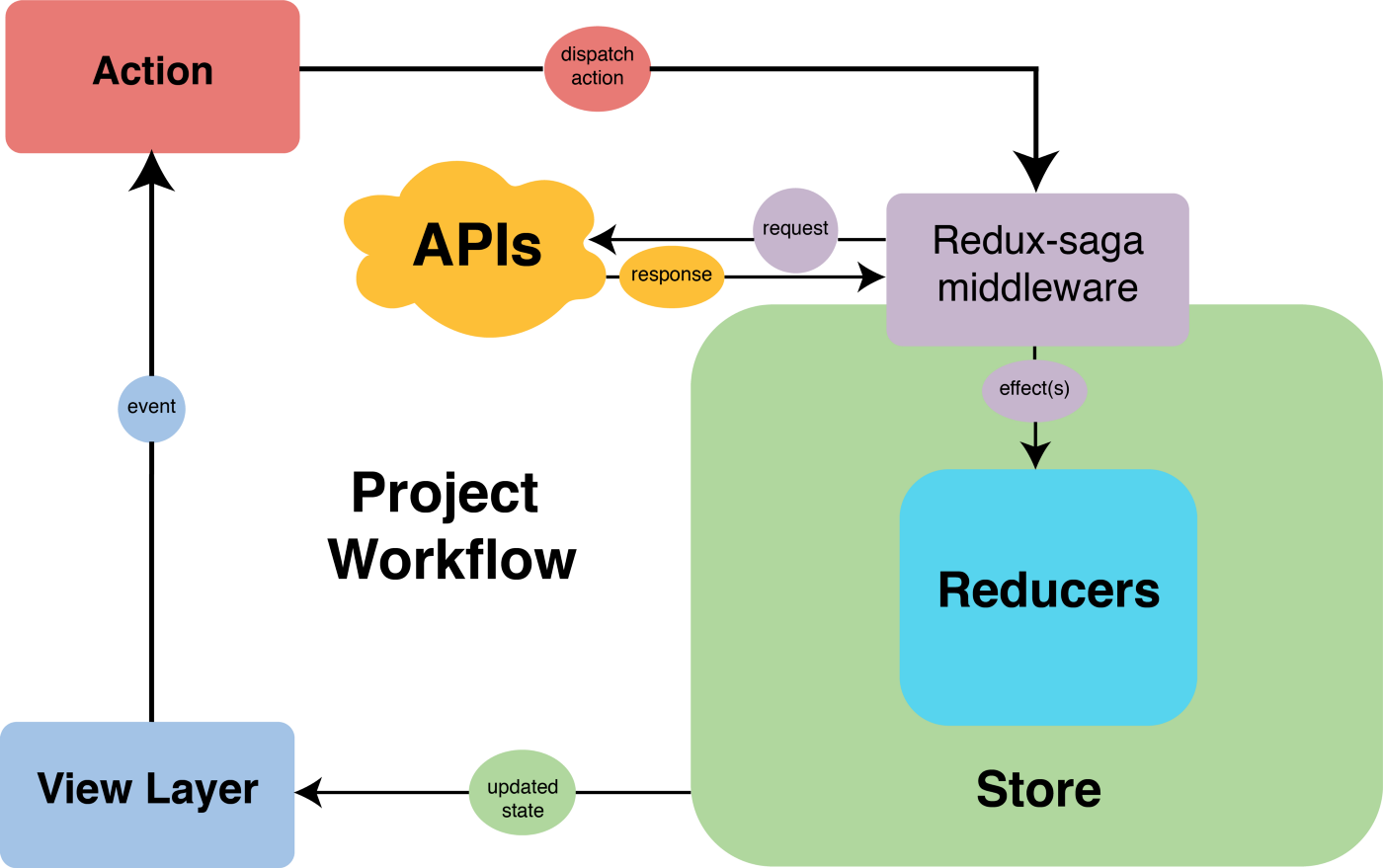
The logic that handles the data that actually populates the UI is the center, or core, of the app. This core, the data-related logic, can be left alone, and the client can swap it out as they please. Redux + Saga is a tool to make sure that the core of your app works in a way that is completely separate from the UI logic, as shown below. When building an app in React, you can also push all of your business logic into Saga and only dispatch at the component level.
Generator syntax to make business logic more believable
This is another reason to use Saga. The generator syntax, which is part of Saga’s identity, helps ensure that the logic you need works in a sequential and rigorous way. The use of yield ensures that asynchronous logic, as well as issuing new actions (put) and calling synchronous functions (call) can all be done in sequence, reducing the chance of unexpected side effects.
As your app grows more complex, you may have logic that needs to be performed immediately after a particular function call completes in a component, and implementing sequential behavior in a component may require async/await and subscribing to a specific value with useEffect to watch for changes, which can add complexity to your logic and leave plenty of room for unnecessary re-rendering. With Saga, you can avoid the complexity of logic inside your components and successfully perform your business logic with a single dispatch.
Maximize reusability of asynchronous API calls
During front-end development, you may find yourself needing unexpected data from unexpected places, completely different from your initial plan, mainly due to the nature of the back-end API. If you’ve been using async await to handle async in a single component, you’ll have to write the same logic once again in a different component.
Servers aren’t always perfect either, so it’s not uncommon for a response to not send all the data you need for your UI. Small teams are more prone to these situations.
It’s not uncommon for the front-end to have to make other asynchronous logic calls to patch together the data the UI needs until the back-end is fixed. If you need to patch specific data in different places in your web app, I think the benefits of using Saga will more than pay for the cost of using it.
Of course, you can also organize all API call functions in one place like util to make it easier to reuse, so it’s a bit vague to say that it’s the only advantage of Redux+Saga. Better yet, in Saga, you can even touch the state of the store, which can change the UI of the app.
Room for ### caching.
There are situations in the flow of a user’s use of your app where you don’t need to fetch data if it’s already in the store. By storing data in the store in this way, you can optimize your app to avoid unnecessary patching.
Why not use ###?
Of course, it’s not all good.
For starters, you might not want to use it because of all the typing, bloated boilerplate mentioned above.
Saga is, after all, middleware for Redux, so the only things it can change are the variables declared in the store. In order for a component to subscribe to changes in properties that are changed by Saga, all of those values must exist in a stored form in the store, so the results of asynchronous requests and even request states like loading, success, and fail must be stored in the store.
In order to write logic that works sequentially, it can be inefficient to write business logic that depends on the app, or to store state values that exist at the component level enough to change the UI.
For example, if you want an alert to pop up after an async call ends, you’ll need to create another state value in the store that manages the alert, and then toggle the state value to match when SAGA finishes patching the data.
function\* getDataAndAlertSaga(action) {
  try {
  const { data } = yield call(fetchData)
    yield put(getDataSuccess({ data }));
    yield put(showAlert()); // toggle the store's alert variable, which should be subscribed to by the component
  } catch(error) {
    yield put(getDataFail({ error }));
  }
}
There’s also no guarantee that the server data stored in store is the most recent data that your component needs right now. Imagine two components that need the same data from the server, but with different UIs, and they need to be rendered in one parent component.
function DataRendering1() {
  const { data } = useSelector((state) => state.data);

  useEffect(() => {
    dispatch(getData({}));
  }, []);

  return (
    <div> <h2>Data list 1</h2>
      <h2>Data list 1</h2>
      {data.map((d) => {
        <ul key={d.id}>
          <li>{d.time}</li>
          <li>{d.person}</li>
        </ul>;
      })}
    </div>
  );
}

function DataRendering2() {
  const { data } = useSelector((state: RootState) => state.data);

  useEffect(() => {
    dispatch(getData({}));
  }, []);

  return (
    <div> <h2>Data List 1</h2>
      <h2>Data list 1</h2>
      {data.map((d) => {
        <ul key={d.id}>
          <li>{d.content}</li>
          <li>{d.time}</li>
        </ul>;
      })}
    </div>
  );
}

function DataPage() {
  return (
    <> <DataRendering1
      <DataRendering1 /> <DataRendering1
      <DataRendering2 />.
    </>
  );
}
In this situation, each of the two child components dispatches an action once to get the latest data, resulting in two asynchronous requests to the server, which is wasteful. If only one component patches its data and the other does not, then depending on the time of rendering, the component that has not patched its data may not have the latest data and may have to use data that was previously patched by the other component.
To overcome this situation, you can combine the two components into one component and dispatch them only once. This is done using state pull.
function DataRenderings() {
  const { data } = useSelector((state: RootState) => state.data);

  useEffect(() => {
    dispatch(getData({}));
  }, []);

  return (
    <> <
      <DataRendering1 data={data} />
      <DataRendering2 data={data} />
    </>
  );
}

function DataPage() {
  return <DataRenderings />;
}
However, even with state pull, if you have multiple child components that need a single piece of data in your store, you may end up with too many components that need to be re-rendered.
To solve this problem, libraries like SWR and React Query specialize in handling asynchronous requests. They understand the pain points of managing asynchronous requests through global state management as listed above, and provide features like caching/re-patching to help keep data fetched from the server fresh. In the case of React Query, we’ve also looked at it in a previous post.
If you look at the overview part of the React Query Docs, it says the following,
While most traditional state management libraries are great for working with client state, they are not so great at working with async or server state. This is because server state is totally different.
The nature of server state and app global state is different, which means they should be managed separately. Using Saga to manage asynchronous logic is a form of “global state management”, which is a way of managing server state that can lead to the inefficiencies listed above.
More things to think about if you use it
Reduce too much typing
To write a single Saga, if you don’t use any helper libraries, you’ll need to type roughly this much.
// 1. redux module

// Action string
export const GET_DATA = 'data/GET_DATA' as const. export const GET_DATA_SUCCESS = 'data/GET_DATA' as const;
export const GET_DATA_SUCCESS = 'data/GET_DATA_SUCCESS' as const; export const GET_DATA_SUCCESS = 'data/GET_DATA_SUCCESS' as const;
export const GET_DATA_FAIL = 'data/GET_DATA_FAIL' as const;

// Action return function
export const getData = () => ({ type: GET_DATA });
export const getDataSuccess = (data: Data) => ({ type: GET_DATA_SUCCESS, payload: data });
export const getDataFAIL = (error: Error) => ({ type: GET_DATA, payload: error });

// Initial state
const initialState: DataState = {
  userData: Data,
  status: 'success' | 'loading' | 'fail',
  error: Error,
}

type DataAction =
  | ReturnType<typeof getData>
  | ReturnType<typeof getDataSuccess>
  | ReturnType<typeof getDataFail>;

// Reducer
export const dataReducer = (state: DataState = initalState, action: DataAction) => {
  switch (action.type) {
    case GET_DATA:
      { return { ...state, status: 'loading' };
    case GET_DATA_SUCCESS:
      return { ...state, userData: action.payload, status: 'success' };
    case GET_DATA_FAIL:
      return { ...state, error: action.payload, status: 'fail' };
    default:
      Return state;
  }
};

export default dataReducer;
// 2. saga
function getDataSaga(action) {
try {
const { data } = fetchData();
yield put(getDataSuccess({ data }));
} catch (error) {
yield put(getDataFail({ error }));
}
}
export function dataSaga() {
yield takeEvery(GET_DATA, getDataSaga);
}In the example above, we didn’t declare all the types, but just showed how to utilize the types we have. If you want to do TypeScript, you’ll need more type declarations.
Saga + Redux is typing-heavy. Even if you’re building an app big enough to make Saga shine, the amount of typing can be exhausting.
In my defense, a lot of typing contributes to the rigor and precision with which Redux + Saga works.
- Redux state changes only happen with the issuance of actions. All actions must be defined in advance, and the action return function used for dispatch must also be defined in advance, resulting in a lot of typing around actions. ⇒ Pro) All aspects of state change are defined in advance, enabling predictable and side-effect-free state management.
- Since all reducers must be pure functions, they must be written with immutability in mind, making reducer typing cumbersome ⇒ Advantage) If the reducer that modifies state is a pure function, it is free from side effects and easy to write tests.
- Saga requires an additional boilerplate because it operates as a middleware separate from Redux ⇒ **Pro) Since all state changes in Redux must be pure, impure logic such as asynchronous requests are handled separately at the middleware end. Impure asynchronous logic that can cause side effects is decoupled from Redux, making Redux’s state more reliable.
But…for the umpteenth time, Redux+Saga is really too much typing, and if you don’t have a plan to reduce the typing of Saga and Redux at the beginning of development, you may find yourself and your fellow developers tired of writing repeated try/catch statements and SUCCESS and FAILURE actions for each saga, and you may find yourself grinding async/await directly into your components.
Here’s a strategy to reduce your Redux + Saga typing.
- Redux Toolkit : Use slice to free yourself from the typing nightmare of declaring actions and action return functions one by one.
- Saga Entity Pattern : In a Saga generator function, you’ll find yourself repeatedly making try/catch statements and toggling each state of asynchronous logic, and you can reduce typing by declaring a fetchEntity function to ease the repetition.
For a real-world example of how to apply Saga typing reduction, I’ve summarized it in a different post.
How much logic can you put in Saga?
// Saga with only asynchronous request related logic
// You can also use it in patterns, like the fetchEntity pattern
function getDataPureSaga(action) {
  try {
    const { data } = fetchData();
    yield put(getDataSuccess({ data }));
  } catch (error) {
    yield put(getDataFail({ error }));
  }
}

// Saga with asynchronous request logic and a bunch of other logic
function getDataImpureSaga(action) {
  try {
    const { data } = fetchData();
    Cookie.set(data.id); // pass in the cookie
    const processedData = nomalizeData(data); // process the data
    yield put(getDataSuccess({ data: processedData }));
  } catch (error) {
    yield put(getDataFail({ error }));
  }
}
Reducers in Redux must be pure functions, but Saga is a library that exists to handle various impure logic with Side Effect Managers, so you can program with various aspects of logic other than asynchronous requests.
There is no fatal flaw in Saga that comes from having logic other than asynchronous request logic, and if you design Saga to house all of your business logic, you’ll probably end up doing so.
This may be a special case, but there may be a point where Saga becomes problematic depending on the shape of your particular app. If you rip Redux+Saga from a React project and use it in a React Native project, it will throw errors if the logic that the web depends on (cookie-related logic… window global objects…) exists in a Saga function.
You need to make a judgment call about whether you want to view Redux+Saga as a part of Core that can be separated from the UI. If you’re likely to start a new web project or mobile app project that requires the existing logic of Saga as is, it’s probably better to view Redux+Saga as part of the core that’s not related to the UI and keep the logic that your product depends on out of Saga. It really depends on the situation.
(I’ve done some development where I moved all of Redux+Saga from one project to another. I did this because the new project had a lot of overlapping Redux+Saga logic with the old project, and it was very overwhelming to rewrite it all over again, but I might not have done it if I had used a lightweight state management tool instead of Redux…)
In another context, you might want to tweak the data you get from the server to make it more palatable to the client, so you might want to process it with a function that, if it succeeds in Saga just before storing it in the store, changes the data on the server accordingly. In the past, I used to do it without thinking about it, and just processed it into a form that was palatable to the client and stored it in the store, but I don’t think that’s a good idea.
Arbitrarily rewriting data on the client can lead to miscommunication with the server developer. The meaning of data and properties can be confusing. In this case, if there is an agreement between the server and client in the form of a specification document, it would be better to store the agreed structure of the data as it is, and only use tools like Reselect or replace the data appropriately in the component when post-processing is needed.
Setting Store properties
It is important to set up properties so that the state of your asynchronous logic is well understood at the component level.
A common use case is to express the state of asynchronous logic in terms of SUCCESS, FAIL, and LOADING. Redux Docs has examples like the following.
{ ```typescript
  status: 'idle' | 'loading' | 'succeeded' | 'failed', // initial | loading | success | failure
  error: string | null
}
However, I sometimes think that the three classic states of SUCCESS, FAIL, and LOADING don’t describe all asynchronous state, especially if the request is a POST, PUT, or DELETE method that attempts to modify data on the server and receives a response rather than a GET, or if you need to throw an exception based on the response code of an error.
{}
  // For multiple ways to fail or succeed
  status: 'idle' | 'loading' | 'succeeded1' | 'succeeded2' | 'failed1' | 'failed2',
  error: string | null
}
I don’t think it’s necessary for all Store properties to be the same, and I think it’s fine to have multiple state types and rotate between them as needed. Instead, it’s better to have a documentation or type declaration so that developers can understand and manage the types. This could be applied to the store type specification in the following way.
type DefaultEntity<T> = {
  data: T;
  status: 'loading' | 'success' | 'fail';
  error: Error;
};

type ParticularEntity<T> = {
  data: T;
  status: 'loading' | 'success' | 'fail1' | 'fail2';
  error: Error;
};

type initialState = {
  data1: DefaultEntity<Data1>;
  data2: ParticularEntity<Data2>;
};
Store and UI variables
We connect Redux to our component by checking for changes in the properties we’ve linked from the component’s useEffect to the useSelector. If you need to raise an alert or something when an asynchronous request fails, this is roughly what you can do at the component level.
function SomeComponent() {
  const dipatch = useDispatch()
  const { data, status, error } = useSelector((state:RootState) => (state.dataReducer), shallowEqual)
  const [showAlert, setShowAlert] = useState(false);

  useEffect(() => {
    dispatch(getData())
  }, [])

  useEffect(()=> {
    if (status === 'fail') {
      setShowAlert(true);
    }
  },[status])

...
}
If you want to handle the UI error handling logic in your Saga unit, you can also change the store’s properties inside the Saga function and subscribe to them in the component unit to make the alert visible.
// saga
function\* getDataSaga(action) {
try {
    const { data } = fetchData()
    yield put(getDataSuccess({ data }));
    yield put(showAlert()); // change store's alert state to true
  } catch(error) {
    yield put(getDatafail({ error }));
  }
}

// component
function SomeComponent() {
  const dipatch = useDispatch()
  const { data, status, error } = useSelector((state:RootState) => (state.dataReducer), shallowEqual)
  const showAlert = useSelector((state:RootState) => (state.alertReducer.showAlert))
  const [showAlert, setShowAlert] = useState(false);

  useEffect(() => {
    dispatch(getData())
  }, [])

  return (
  <div> <div
    {showAlert ? <Alert/> : null}
    ...
  </div>
  )
}
In this way, Saga can handle the completion of asynchronous logic and the UI processing that comes with it. It’s like having logic that does everything in Saga all at once, but there’s something to consider.
Of course, the store can hold asynchronous data as well as state values that need to be globally stateful, but what constitutes global state depends on the developer’s point of view.
As shown above, if you store the showAlert value in the store and only manage alerts higher up the component tree, you can handle alerts without wasting state values in components further down the tree. However, I personally think it’s better to use the ContextAPI in this case and inject the value only for components that need to control alerts. After all, you don’t need to control Alerts in every component.
In fact, thinking about it this way, it makes me wonder if it makes sense to store all asynchronous data in the Redux Store since it’s not accessed by all components…
Closing thoughts
Redux + Saga is a lot of typing and a steep learning curve, but I think it can be a great tool to solidify the core of your app if you use it in the right way. Now that I’ve organized it, all that’s left is to use it well. Of course, I still don’t feel confident that I can use Saga in the best way for every situation.
My company is using Saga and all of our asynchronous related logic is handled in Saga. I’ve been researching other libraries like React Query to refactor it because the code is huge and other members of the development team are getting tired of it, but I can’t improve it all at once, so I’ll probably keep using Saga and continue to explore ways to use it more efficiently.
I’d like to have the experience of using Saga as I’ve thought about it, further developing my use cases, and eventually contributing to the service. Thank you for reading this long post with short thoughts.